Christopher Fryant's Blackout LoRA kills the lights and keeps the motion
Part 3 of Christopher Fryant's You already know LTX series switches off a bumper car hall and lights it with a flashlight, and the motion holds even as the model redesigns the cars. Parts 1 and 2 use official Lightricks LoRAs, every part runs through the $30 Grok Bot plan, and the series is labeled a paid partnership on X.
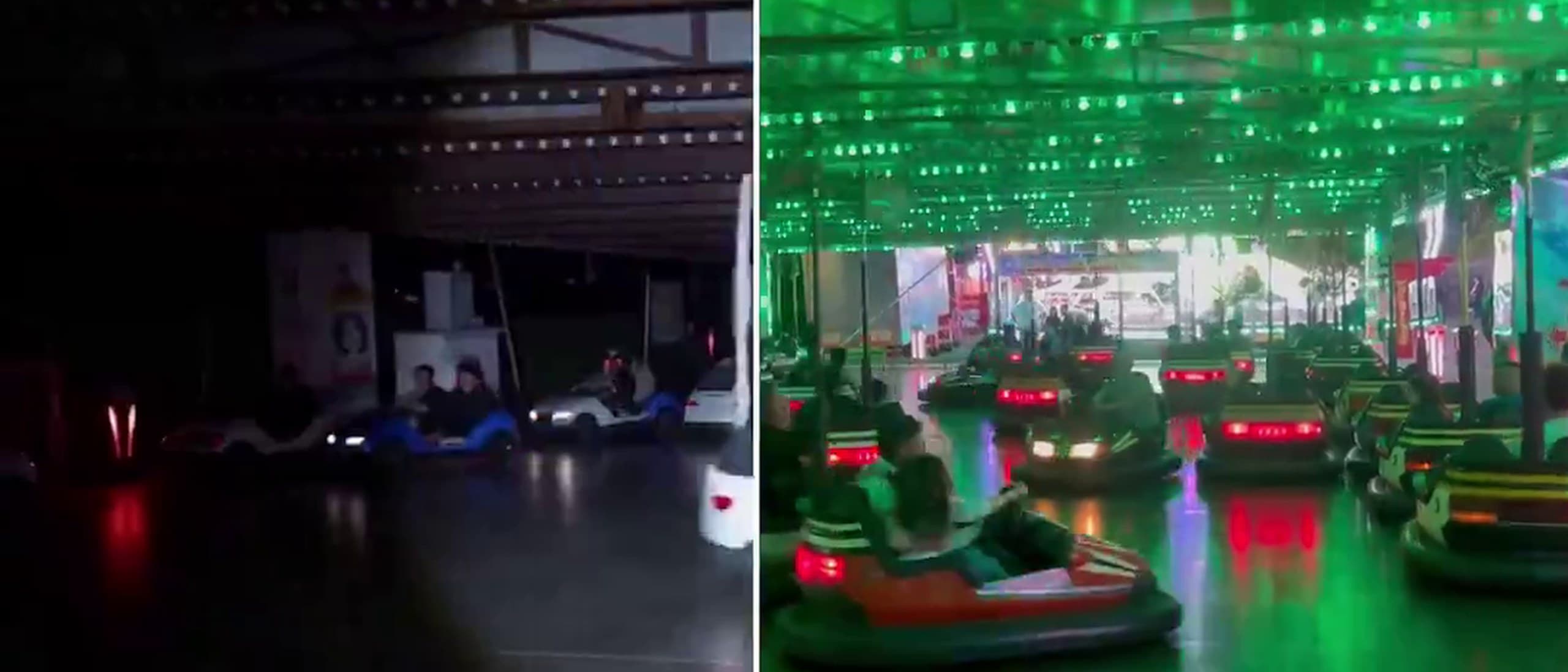
The clip opens on a bumper car hall lit like an aquarium, with rows of green LEDs across the canopy, pink and red neon on the walls and riders bumping through the glare. Then a hard edge slides in from the left, and behind it the hall goes dark. A single flashlight pool sweeps the floor, and the cars keep moving through it as if somebody had pulled the breaker halfway through the session.
That five-second clip is Part 3 of Christopher Fryant's "You already know LTX" series, posted on X on Monday, 5 October. It introduces Blackout, which he describes as his first LTX IC-LoRA, built to "turn the lights off in any scene and light it with a flashlight." Fryant (@cfryant) is a New Hampshire 2D and 3D artist with 27 years in the trade, and he lists xAI, ByteDance, Coca-Cola, Amazon and Luma Labs among his clients.
What the effect gets right
The motion is what sells it. Cars hold their paths through the wipe, riders stay in their seats, and nothing smears or melts as the light drops away. Shapes stay coherent from the first dark frame to the last, and the flashlight halo behaves like a real beam across a polished floor. If you only saw the after, you would take it for a plate shot in the dark.
It is not quite the same hall with the power cut, though. Watched frame by frame, the model rebuilds the set as it relights it: the round neon bumper cars come back as white, car-shaped ones, and the green LED canopy turns into a plain roof with brown trusses. That is what a generative relight does, so the result is a convincing reinterpretation rather than a faithful copy. For a horror beat or a power-cut gag, convincing is the brief. For continuity work that has to cut against the original plate, check the details before you commit.
Three effects, one usable trick at a time
Blackout is the third entry. Part 1, on Wednesday 23 September, emptied a Times Square shot of people. Part 2, on Tuesday 29 September, soaked a dancer against a tiled wall. Each arrives as a short silent clip plus a six- or seven-post thread that walks you from install to render, which is why the series works: every part is one effect, small enough to try the same evening.
- Part: 1. Posted: Wed 23 Sep; Effect: Remove people from a shot (Times Square); LoRA used: Lightricks Clean Plate (official)
- Part: 2. Posted: Tue 29 Sep; Effect: Add water to a shot (dancer against a tiled wall); LoRA used: Lightricks Water Simulation (official)
- Part: 3. Posted: Mon 5 Oct; Effect: Blackout: lights off, lit by a flashlight (bumper car hall); LoRA used: Blackout, his own (per Fryant)
Credit sits in two places. Parts 1 and 2 run on Lightricks' own official IC-LoRAs, Clean Plate and Water Simulation, and Fryant's contribution there is the packaging that gets them running with almost no setup. Blackout is the first effect he says he trained himself. We could not find a public upload of it, because it installs through his own command, so how he built it is still his story to tell.
How the workflow reaches you
The series title carries its own punchline: you already know LTX, because Grok Bot knows it for you. Each thread starts with installing Grok Bot, xAI's agent product, and signing up for what Fryant calls "the 30 dollar a month plan", which the Grok plans page lists as SuperGrok. His commands then do the setup, with /comfy-install preparing ComfyUI and /ltx-blackout-lora loading the effect. The Blackout setup also asks for an API key without saying which service it belongs to, so plan for a cloud step rather than assuming everything runs on your own machine.
All three posts carry X's "Paid partnership" label, and the partner is not named on the posts. Fryant has been vocal about doing this properly. On 30 September he wrote that a company had tried to get him to run paid promotions "without turning on the legally required paid partnership tag" and that it had been blocked and reported. The label is on every part of this series, and he deserves credit for it.
Why the format is worth copying
In practice, for anyone making work this week, the value is in how Fryant teaches. He hands out workflow in bites you can actually use, with one effect, one clip, one thread and a working command at the end of it. People are saving it as a how-to. By Tuesday morning Part 3 had 155 likes and 106 bookmarks, and Parts 2 and 3 each passed roughly 10,000 impressions, well above the 1,000 to 2,000 his posts usually reach.
He has also said what comes next. Replying under Part 3, he said a tutorial on making your own effect is "coming in the next few days." That is the entry we most want to see, because it would turn Blackout from a trick you install into a method you can repeat on your own footage. The earlier parts, on removing people from a frame and adding water to a shot, are on his X feed now, and the whole series is worth an evening.
Clips and frames are by Christopher Fryant (@cfryant), made with LTX and ComfyUI and shared on X, where the series is labeled a paid partnership. They are used here with credit. If you are the maker and want any of it taken down, message @the__generated on X and it comes down.
Your Voice
What I need is a LORA to make it abandoned. No people anywhere, as far as the eye could see.
Just make the ugly version and let AI finish the job.
For AI video, true high-resolution output has been the bottleneck: shrink the plate, edit it, scale it back up, and lose the detail you shot 4K for.
Quoted from public posts on X and credited by handle. If one of these is yours and you want it removed, message @the__generated on X and it comes down.
Got something to say? Tag @the__generated on X