Luma's Shot Coverage turns one take into new angles. Seedance does the shooting
Luma's Shot Coverage turns one short take into performance-led, action-led and spatial-led angles an editor can cut with. Its own product page says Seedance does the work, inserts hold up better than close-ups on a pause, the dialogue returns in a new voice, and the cost is unpublished.
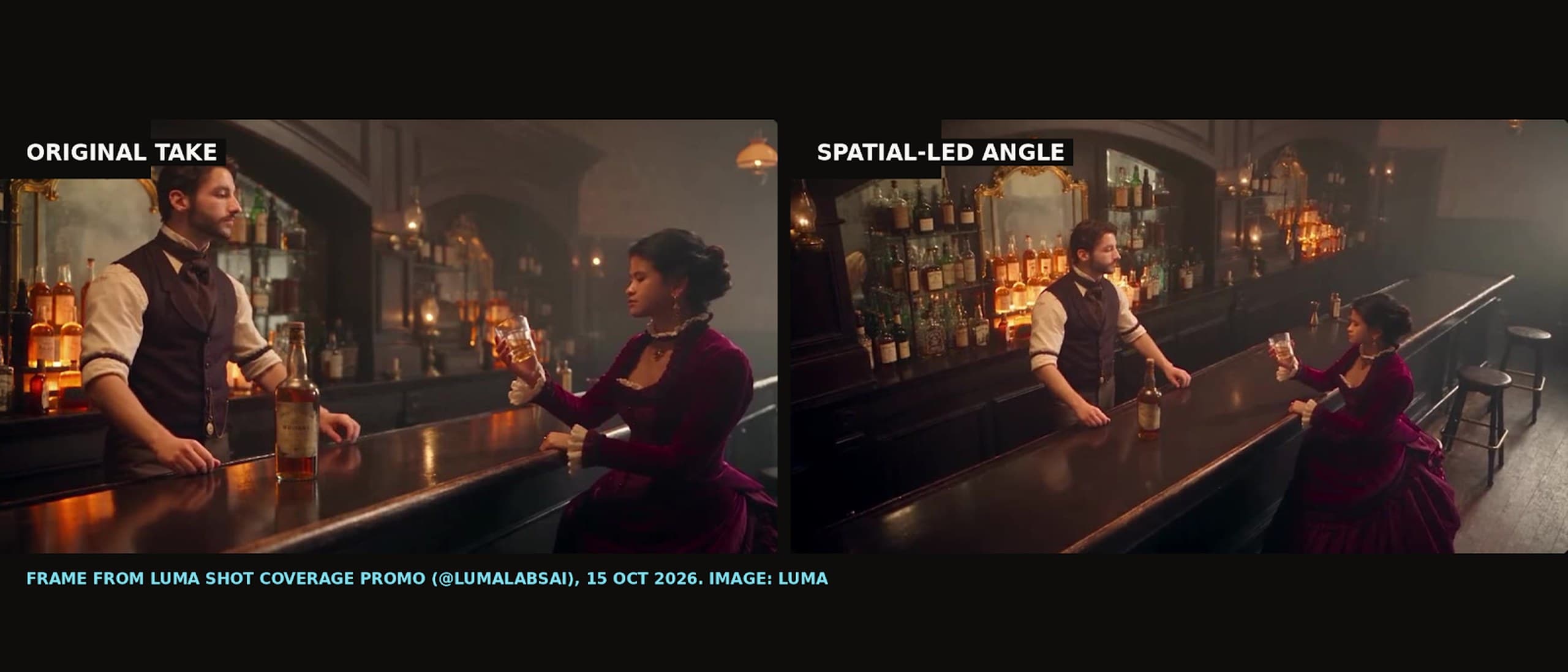
A bartender in a waistcoat pours whiskey for a woman in a burgundy velvet dress, and the camera never moves. Then the same pour comes back as a tight insert of the bottle and glass, the same room comes back as a wide shot down the length of the bar, and the woman comes back in a close-up as she drinks. That 10-second clip is how Luma introduced Shot Coverage on Thursday 15 October, with a line any editor will recognize: "Got the take. Need another angle?"
Coverage is a film word, and Luma used it on purpose. On a set, coverage means the wides, mediums, close-ups and reverses that give an editor somewhere to cut. A single good take with no coverage leaves a scene stuck in one frame. Luma's pitch is that you upload that one take and get the missing angles back, but the product page shows the engine underneath belongs to someone else.
What Luma actually shipped
The product page describes the job simply: "Upload one short take. The same action comes back re-shot from new camera angles, one take for each coverage type you pick." There are three types, and you can choose up to all three. Performance-led follows the actors, action-led goes in tight on what the hands are doing, and spatial-led pulls back to show the room. You also set an output resolution and choose whether the result has sound.
The resolution setting carries the most telling sentence on the page: "Auto takes the nearest size Seedance offers to your source, never lower." Seedance is ByteDance's video model, which Luma has offered inside its app as a third-party model since August. Shot Coverage is a preset built on top of it, not a new capability from Luma's own Ray models. Luma's terms of service say output from third-party AI tools is "subject to the third party's terms and conditions and not this Agreement," and Luma disclaims liability for it.
There is no Luma news post or changelog entry for the launch, just the X post and a product page. It is also the fifth preset of this kind Luma has promoted in a month, after Camera Angles for stills on 15 September, Variants for ads on 1 October, Product Shots on 9 October and Relight Studio on 12 October. Each arrived with the same X template, a one-line hook, a demo and a "Try it in Luma" reply, so this is a marketing cadence rather than a model launch.
Re-angling footage is not new
Generating new angles from a clip you already have has been on the market for over a year. Runway's Aleph could generate new angles from existing footage when it launched in July 2025, and Aleph 2.0 does it today in Runway's Edit Studio. Seedance 2.5 prompt guides described re-angling a shot you already have in early August 2026, and Curious Refuge tested Seedance 2.5 and MiniMax H3 doing exactly that on 5 September.
Luma's contribution is the packaging. Instead of writing a camera prompt and hoping, you pick from three coverage types named the way an editor thinks about a scene. That vocabulary is the smart part of the launch, and it is also why the demo deserves a close look.
What the demo shows on a pause
We pulled the promo video and the example files from the product page and went through them frame by frame. The action-led inserts are the strongest material. In the pour shot, the bottle, the waistcoat and the pocket-watch chain all match the original, which makes sense because a tight insert hides most of the set. The spatial-led wide also reads as the same room, with the same dress, bar and bottles.
The performance-led angles are where it slips. About four and a half seconds into the promo, an over-the-shoulder angle on the woman swaps the dark, lamp-lit bar for a gray room with bright daylight windows behind her. A few seconds later, her close-up sits against a plain gray wall, and her face reads slightly different from the wide shot. At two seconds on a phone, most people would miss it, but an editor cutting it beside the original take would not.
Two more details matter for anyone planning a cut. One 12-second example output on the product page is itself a five-shot sequence, with scene changes at roughly 2.3, 4.9, 8.75 and 10.4 seconds, so an output may arrive as a mini-sequence rather than one clean angle. And the source take is an unlabeled period saloon scene that looks generated. Luma has not shown the tool working on footage shot with a real camera.
The voice and the bill
The biggest practical limit is written on the page. With audio on, you get "Generated sound, including the source's dialogue in a new voice." With audio off, the takes come back silent and "the actor still speaks the lines." Either way, the new angles do not carry the actor's own voice, so anyone with a real performance will be cutting picture against the original sound.
Luma lists no price for Shot Coverage. Its pricing page puts Seedance 2.5 video-to-video at about 94 credits a second at 720p and about 230 at 1080p, with the Plus plan at $30 a month for 10,000 credits. If Shot Coverage bills at that rate, which is our assumption and not something Luma has confirmed, all three angles of a 12-second take would cost roughly 3,400 credits at 720p or roughly 8,300 at 1080p. On Plus, that 1080p run would use about 83% of a month's credits for a single shot.
Where creators come in
For AI-native shorts, generating coverage from a hero take is now a real workflow, and it is available in several tools at once. The people best placed to use it are the ones who already think in coverage, because the skill is knowing which angle a scene needs and spotting when a generated one breaks continuity. The replies under Luma's post are asking exactly that, whether eyelines, light direction and the 180-degree rule hold across the cut, and Luma had not answered any of them by Friday morning.
In practice, for anyone making work this week, that points to a simple order of operations:
- Test inserts first, since hands, props and close details are where the demo holds up best.
- Check every performance-led angle against the source for lighting and background before it goes near a timeline.
- Run a 720p test before committing a 1080p run, because the credits add up fast across three angles.
- Plan the sound separately, because the new angles come back with a new voice or none at all.
Shot Coverage is a well-named preset on a borrowed model, and it is genuinely useful for filling out a scene that only has one angle. The open questions are the ones an editor would ask on day one: what it costs, how long a take it accepts, and whether it holds up on footage that came out of a real camera.
Timeline
- Date: Fri 18 Apr 2025. What happened: Luma adds Camera Angle Concepts to Ray2, prompt-driven framings for new generations; Source: Luma changelog
- Date: Jul 2025. What happened: Runway Aleph launches with new angles generated from an existing clip; Source: Runway Academy
- Date: Wed 5 Aug 2026. What happened: Seedance 2.5 prompt guides describe re-angling an existing shot; Source: omniart.studio
- Date: Aug 2026. What happened: Seedance 2.5 goes live inside Luma as a third-party model; Source: Luma news; PricingSaaS
- Date: Sat 5 Sep 2026. What happened: Curious Refuge tests Seedance 2.5 and MiniMax H3 changing the camera angle of existing footage; Source: Curious Refuge
- Date: Tue 15 Sep 2026. What happened: Luma Camera Angles turns one still into many angles; Source: Luma product page
- Date: Thu 1 to Mon 12 Oct 2026. What happened: Luma promotes Variants, Product Shots and Relight Studio presets; Source: Luma on X
- Date: Thu 15 Oct 2026, 13:08 UTC. What happened: Luma announces Shot Coverage on X; Source: X API
Sources and what is unconfirmed: Luma's X post of 15 October and its replies (X API); the Shot Coverage product page, pricing page and terms of service (read 16 October); the promo video and product page example files, reviewed frame by frame without sound; Runway Academy and Curious Refuge for prior art. Pricing, the Seedance version, maximum input length and resolution, and whether the demo source was shot or generated are unconfirmed. We have not run the tool ourselves and have not yet put our questions to Luma.
Images: frames from Luma's Shot Coverage promo, credited to Luma. If you are the rights holder and want an image removed, contact us and it comes down.