Rory Flynn rebuilt the Fast & Furious finale as one drone shot, and showed his work
Rory Flynn rebuilt the Terminal Way finale of The Fast and the Furious as a single FPV-drone take, using Opus 5.5, a gray-box Blender previs and a second-by-second Seedance 2.5 prompt. The crash physics and paint hold up and the full workflow is public, though it re-stages the 2001 scene and leans on frames of the film.
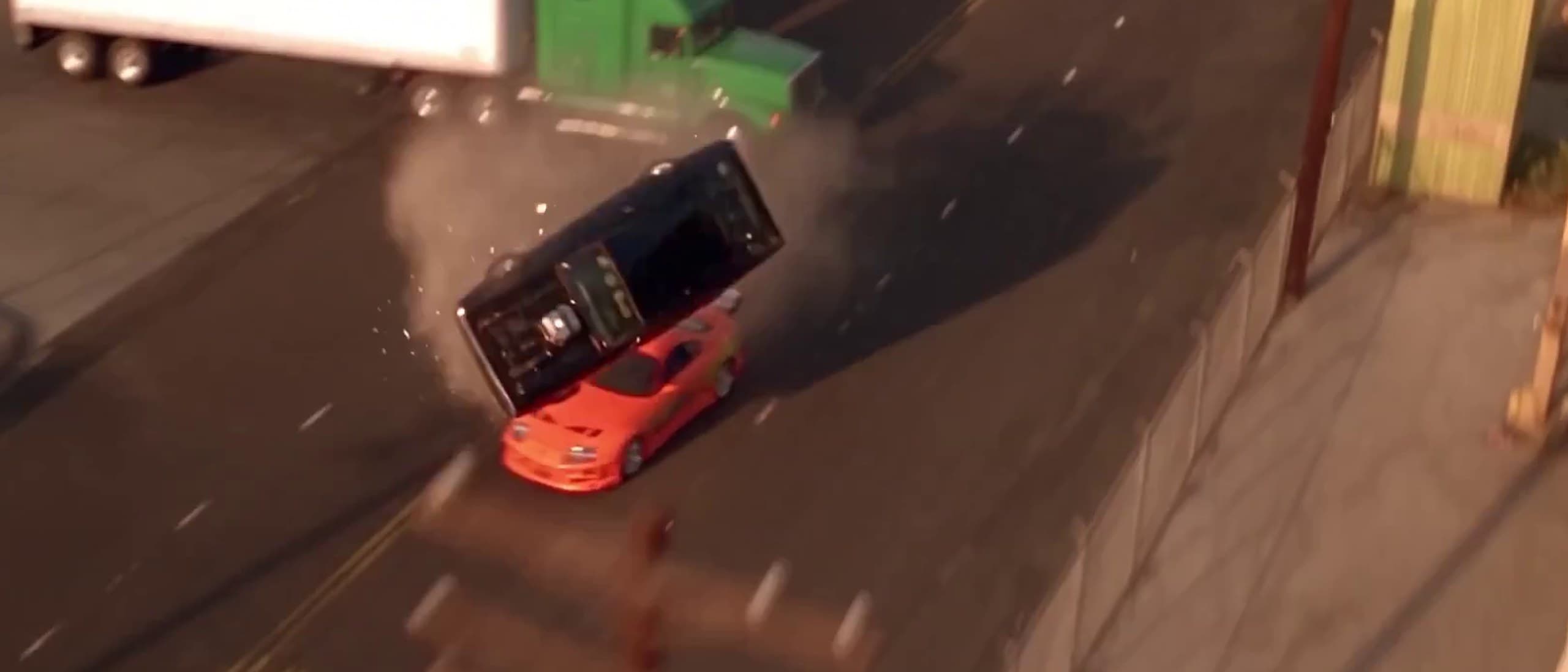
The Supra kicks off the line in a cloud of dust, the black Charger alongside it with its chrome blower catching the low sun. The camera stays down at bumper height as the two cars run door to door, then lifts and pulls ahead of them as they clear a level crossing with a freight train rolling behind. It keeps climbing to a drone view over a four-lane industrial road, and from up there you watch the Charger clip a green-cab semi and barrel-roll into the dust while the Supra brakes past.
It is the ultimate showdown between American muscle and JDM, and it plays in one take. Rory Flynn (@Ror_Fly), a Brooklyn-based AI workflow builder and co-host of the Fast Hours podcast, posted the 25-second short on X on Tuesday night under the title "Found footage from Fast & the Furious." The footage is not found, and the joke is the point. The iconic finale of the 2001 film gets a new scene, and it would feel at home within one of the blockbuster installments.
What Rory actually made
The original ending, shot on Terminal Way on Terminal Island in Los Angeles, has Dom's Charger and Brian's Supra beat a train over the tracks before the Charger slams into a semi and flips. Rory's version keeps the cars, the street, the train and the truck, and rebuilds the staging around them. His prompt names the same streets the film used, Tuna Street, Terminal Way and the Earle Street crossing. What changes is the camera: one unbroken shot from what the prompt calls "a racing FPV drone carrying a small cinema camera" instead of the film's cut coverage, and a different crash, with the Charger clipping the truck's bumper rather than hitting it head on.
The craft is in the physics. Steering, suspension and crash physics are accurate, and photorealistic reflections in the paint add to the realism and believability of the entire short. Rory's own line on the post was simple: "The crash physics got me." Only the foley feels a little stiff compared to its blockbuster counterparts, which is the one place the short gives itself away.
A textbook lesson in this workflow
The reason this is the Video of the Day is that Rory showed the whole method. The post itself is a split screen, with the Seedance 2.5 output on top and a gray-box render labeled "BLENDER PREVIZ v008" underneath, and the thread holds the full package: the previs video, a car reference sheet, an environment sheet and the complete prompt. He names three tools for it, Anthropic's Claude Opus 5.5, Blender and ByteDance's Seedance 2.5.
- Step: Study the scene. Tool the maker named: Opus 5.5; What it did, in his words: Pulled the original clip with a local ffmpeg tool, took screenshots and built contact sheets for itself
- Step: Block the move. Tool the maker named: Blender, with Opus 5.5; What it did, in his words: Gray-box previs of the camera path, car positions and crash timing, about 29 seconds
- Step: Set the look. Tool the maker named: Reference sheets; What it did, in his words: One sheet of car photos, one of environment and cinematography references
- Step: Write the beats. Tool the maker named: Prompt; What it did, in his words: A second-by-second beat sheet from 0 to 29 seconds, with rules for camera, physics and sound
- Step: Generate. Tool the maker named: Seedance 2.5; What it did, in his words: Rendered the shot from the previs frames and references, trimmed to 25 seconds
The prompt is the part worth reading in full. It treats the previs as timing only, telling the model to follow "its single continuous camera path" and "crash motion and beat timing second for second, and take NOTHING else from it." It writes the physics out longhand: "The cars are fighting, never gliding: body roll into every swerve, squat under throttle, noses dipping on shifts." It orders "one continuous shot" and prohibits any cut, and the output delivers that, because there is no cut anywhere in the 25 seconds. It closes on a rule most people forget to write, which is to prohibit slow motion in the crash and keep "real speed, real gravity."
Asked whether he had fed Seedance a depth pass, Rory said it got "Just the rendered frames refs," and that the model "Doesn't stick to it 100%..but really close..especially on the crash." Seedance 2.5 launched at the end of July with support for gray-model reference input, which is exactly the trick on show here: the 3D blockout carries the choreography, and the video model paints it.
Where it came from
This is the latest step in a public lab Rory has been running on X all year. In August he posted "Fixing 2 Fast 2 Furious CGI," reworking effects shots from the sequel with Seedance 2.5, depth maps and masks, which passed 71,000 impressions. In late September and early October he tested multi-angle blocking in Three.js and fed the results to Seedance as references. The Fast & Furious finale pulls those threads together, with Opus 5.5 helping on the scene study and the blockout before a single frame is generated.
His inputs include the film itself. The environment sheet he posted later in the thread is built from frames of the 2001 movie, with the cars removed, and the model he used was almost certainly trained on footage like it, a point one reply made directly. Studios have pushed back on ByteDance's video models before, with Disney and Paramount sending cease-and-desist letters over Seedance 2.0 in February. The method itself does not depend on any of that, though. Rory has already shown it working on scenes he blocked from scratch.
Why it matters to anyone making work
In practice, for anyone making work this week, the lesson is to block the move in free 3D first, write the physics into the prompt, and let the video model do the painting. Blender costs nothing, a gray-box previs can be rough, and the camera move you design is the one you get back. People are saving it as a reference: by Wednesday morning the post had about 7,300 impressions and 150 bookmarks, more bookmarks than likes, at roughly three times a typical post of his on day one.
Rory's prompt and both reference sheets are in his thread on X, and his Fast Hours channel is on YouTube. Watch the split screen twice, once for the cars and once for the gray boxes underneath.
The short is by Rory Flynn (@Ror_Fly), made with Opus 5.5, Blender and Seedance 2.5 and shared on X. It depicts cars and a scene from The Fast and the Furious (Universal, 2001). It is featured here with credit and a link to the original post. If you are the maker or a rights holder and want it taken down, message @the__generated on X and it comes down.
Links for QA (plain URLs, no in-body hyperlinks in the CMS):
- https://x.com/Ror_Fly/status/2107572909086761325
- https://x.com/Ror_Fly/status/2107572913800970508
- https://www.youtube.com/@FastHoursAI
Your Voice
Forgive me, I’ve never used, opus. How does opus see the scene to build it out in blender? I thought opus couldn’t see video.
Blocking it in Blender first is the smart part. Did you feed SD2.5 a grayblock/depth pass or just rendered frames as refs?
Rory it would be cool to test it with complete different visual styles, so It does not leverage the movie footage data it was most certainly trained on.
Quoted from public posts on X and credited by handle. If one of these is yours and you want it removed, message @the__generated on X and it comes down.
Got something to say? Tag @the__generated on X